ZPD is the self-hosted dashboard for organizations running the ZelSafe app and RCCS training workflow. Employees train on their devices, export cryptographically signed audit evidence, and upload it straight to your private ZPD instance. Rocheston never receives the employee data.
# pull the official image $ docker pull rocheston/zpd:latest # run with persistent private storage $ docker run -d --name zpd \ -p 8888:8080 \ -v zpd-storage:/var/lib/zpd/storage \ rocheston/zpd:latest
ZelSafe Private Dashboard is Rocheston's private, employer-side compliance-evidence portal for RCCS cybersecurity awareness training — one local place to receive, verify, store, search, review, and export employee training evidence generated by the ZelSafe app.
ZPD is a self-hosted PHP/SQLite application packaged as a Docker image. Your organization runs it on its own server, workstation, private VPC, intranet, lab network, or secure environment — you own the deployment end to end.
Training happens on the employee device. Evidence uploads directly to the employer. Rocheston does not collect the employee training data. Everything else in ZPD follows from that.
Five steps, one direction of travel: from the employee's device straight to your private server.
Privacy as a property of the architecture, not a promise in a policy document.
/var/lib/zpd/storage.A locally stored, signed evidence record reviewable in the ZPD dashboard. The employee never creates a third-party vendor account or sends private training data to Rocheston.
ZPD builds the workforce view from uploaded evidence records — ideal for organizations that do not want to synchronize HR systems, Azure AD, Okta, or other identity stores with an external vendor.
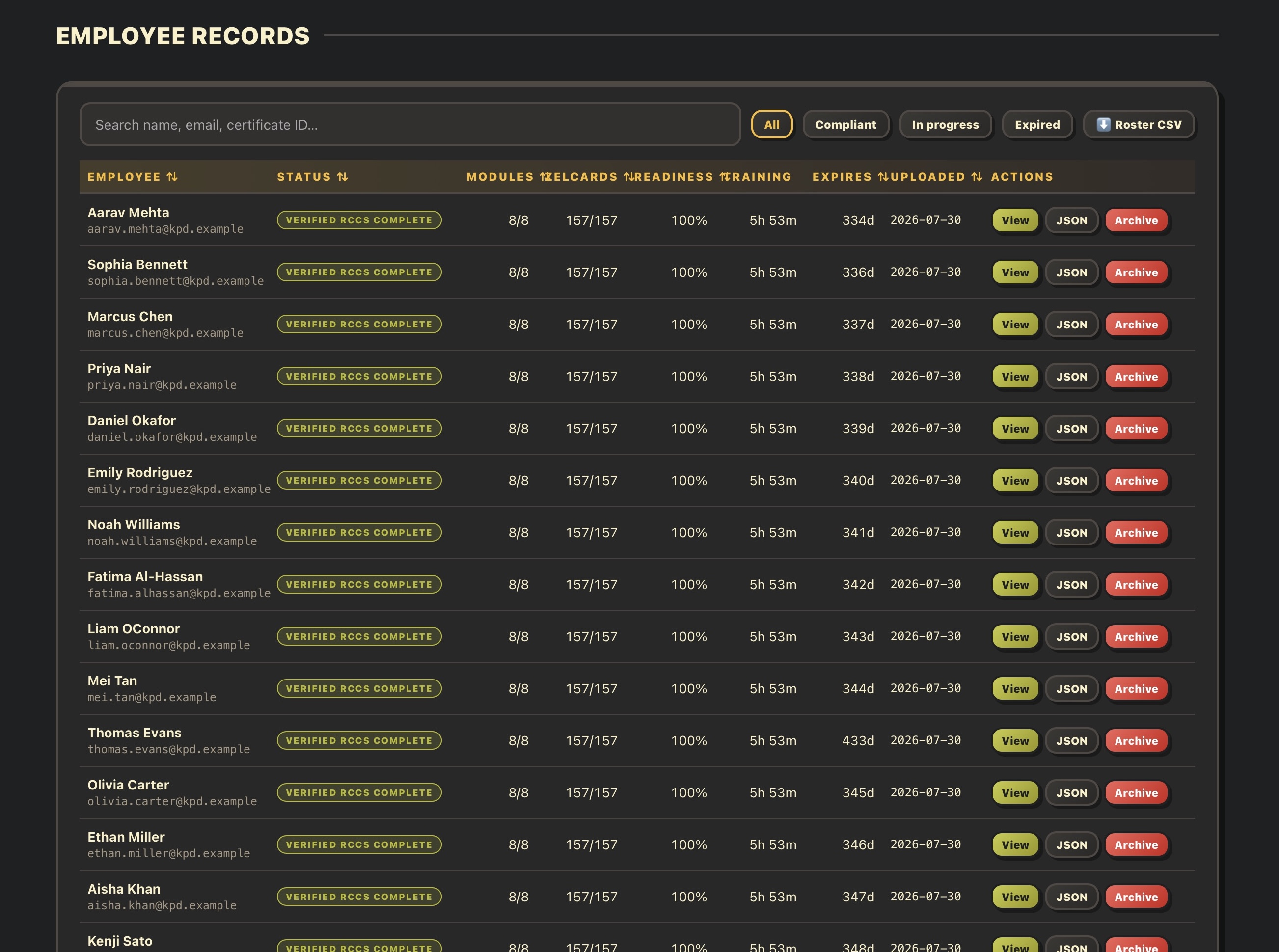
Visual KPIs for employees, verified completions, workforce coverage, readiness, evidence freshness, expired records, and records needing attention.
Verifies uploaded audit JSON files with ECDSA P-256 and preserves the original evidence package for later inspection and audit review.
PDF reports, CSV rosters, JSON evidence views, certificate details, and one-click auditor evidence ZIP packages.
Authenticated admin area for settings, CORS controls, upload PIN configuration, sample data, reset controls, and maintenance.
Simple embedded storage with no external database server — suitable for small teams, labs, pilots, and secure internal deployments.
Public SBOM package supports software inventory, vulnerability review, license review, and procurement documentation.
The official Docker image is published as rocheston/zpd. It exposes the web application on container port 8080 and stores persistent data in /var/lib/zpd/storage. Pull, run, open — that's the entire install.
| Task | Command / URL | Purpose |
|---|---|---|
| Docker Hub | https://hub.docker.com/r/rocheston/zpd | Official Rocheston ZPD container page. |
| Pull image | docker pull rocheston/zpd:latest | Downloads the latest ZPD release. |
| Run container | docker run -d --name zpd -p 8888:8080 -v zpd-storage:/var/lib/zpd/storage rocheston/zpd:latest | Starts ZPD with persistent local volume storage. |
| Upload page | http://localhost:8888 | Employee-facing upload page for signed ZelSafe audit JSON files. |
| Admin console | http://localhost:8888/admin | Employer dashboard, reports, settings, and management. |
| First login | admin / admin Change required | First login requires setting a private administrator password. |
| Storage | /var/lib/zpd/storage | SQLite database and original uploaded evidence files. |
The built-in first login is admin / admin. Before using the dashboard, the administrator must set a private password.
Administrator passwords are stored with Argon2id when supported by the PHP runtime, falling back to the strongest supported algorithm.
The login flow throttles repeated failed attempts to reduce brute-force risk; PIN-protected uploads lock out after repeated wrong tries.
HTTP-only cookies, CSRF protection on every state-changing action, and POST-based logout.
The database sits outside the public web root in the configured storage directory and should be mounted as a private Docker volume.
Allow browser-based remote upload clients from all origins, or restrict them to selected trusted origins only.
Evidence that security leaders, auditors, compliance teams, and government reviewers can inspect — without needing access to any Rocheston system.
| Evidence | What It Shows | Use Case |
|---|---|---|
| Dashboard KPIs | Workforce completion, readiness, exceptions, expiring evidence, and attention items. | Operational compliance management. |
| Employee roster | Uploaded evidence status per employee. | Manager review and follow-up. |
| Certificate view | RCCS certificate details and validation hash. | Individual proof of completion. |
| Auditor package | Original JSON evidence, SHA-256 manifest, and supporting reports in one ZIP. | SOC 2, ISO 27001, HIPAA, NIS2, internal audits. |
| SBOM package | Software components, vulnerability scan evidence, licenses, provenance, and checksums. | Supply-chain and procurement review. |
ZPD's value for compliance programs comes from local control, zero vendor data transfer, cryptographically verifiable evidence, and audit-ready exports. Because employee data remains on customer infrastructure, ZPD can materially support data-minimization, sovereignty, vendor-risk-reduction, and evidence-retention expectations.
Final compliance outcomes always depend on the customer's full environment, policies, controls, hosting model, and authorization boundary.
Pull the official image, mount a volume, and your private compliance-evidence portal is live.